Bookmarks #





Bookmarks in your filesystem.
bookmarks.toml
(filesystem config)
       |
       v
bookmarks-core
(config + storage + open)
       |
       +--> bookmarks CLI
       |       +--> opens names, aliases, groups
       |       +--> --webapp starts Axum webapp
       |       +--> --app starts Tauri desktop app
       |
       +--> bookmarks-webapp
       |    (Axum UI/routes on localhost:1414)
       |
       +--> bookmarks-app
            (Tauri shell)
              |
              v
       127.0.0.1:0 loopback webapp
              |
              v
       Tauri WebView
              |
              +--> local app routes stay in the WebView
              +--> bookmark URLs open in the OS/browser
Screenshot of the web/desktop app:
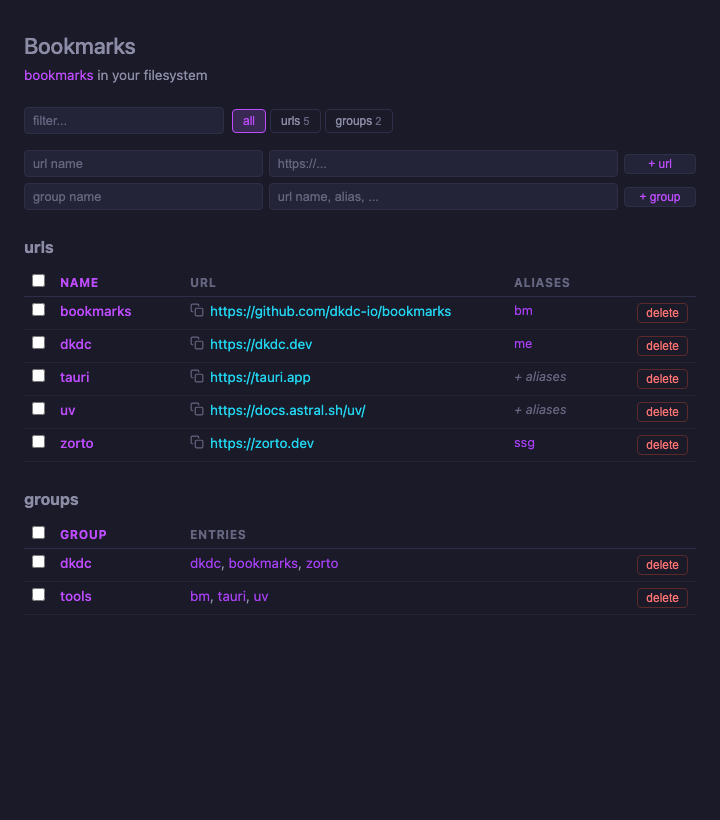
Web & desktop application.
Install #
Recommended:
curl -LsSf https://dkdc.sh/bookmarks/install.sh | sh
Pre-built binaries are available for Linux and macOS via Python (uv). Windows users should install via cargo or use macOS/Linux.
uv:
uv tool install dkdc-bookmarks
cargo:
cargo install dkdc-bookmarks --features app,webapp
Verify installation:
bookmarks --version
You can use uvx to run it without installing:
uvx --from dkdc-bookmarks bookmarks
Usage #
bookmarks [OPTIONS] [URLS]...
Configuration #
Bookmarks looks for a config file in this order:
--bookmarks-file/-fflag (explicit path)--local/-lflag (creates./bookmarks.tomlif missing)bookmarks.tomlin the current directory (must exist)$HOME/.config/bookmarks/bookmarks.toml(global, auto-created)
Example:
[urls]
dkdc-bookmarks = "https://github.com/dkdc-io/bookmarks"
github = { url = "https://github.com", aliases = ["gh"] }

[urls.linkedin]
url = "https://linkedin.com"
aliases = ["li"]

[groups]
socials = ["gh", "linkedin"]
URLs can be plain strings, inline tables with aliases, or expanded tables. Groups reference url names or aliases.
Use --config to edit the configuration file in $EDITOR, or use --app / --webapp for the local GUI.
Open urls #
Open urls by name, alias, or group:
bookmarks github
bookmarks gh linkedin
bookmarks socials
You can input multiple url names, aliases, or groups at once. They will be opened in the order they are provided.
Options #
Available options:
| Flag | Short | Description |
|---|---|---|
--bookmarks-file <PATH> | -f | Use a specific bookmarks file |
--global | -g | Use global config, ignore local bookmarks.toml |
--local | -l | Use local config (./bookmarks.toml), create if missing |
--config | -c | Open active bookmarks file in $EDITOR (use -gc for global) |
--app | -a | Open Tauri desktop app (requires app feature, which includes webapp) |
--webapp | -w | Open the web app in browser (requires webapp feature) |
--help | -h | Print help |
--version | -V | Print version |